Put IT There
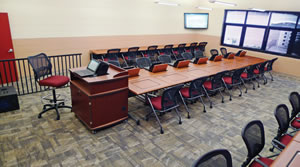
PHOTO COURTESY OF SMARTdesks
Well-designed learning
spaces are paramount to the
college campus. But it’s not
just the Apple TVs, Chromebooks and iPads
that make up the educational environment.
The often-overlooked components that
charge, support and store technology —
namely, audio/visual lecterns, charging
carts, and various types of mounts — are
just as important to ensure classroom success
and boost learning potential.
Robust and Resilient
Lecterns, carts and mounts are
required to endure much abuse due to
movement and the touch of countless
hands throughout their life cycle. Selecting
products that can withstand stress
and, at times, misuse is a very significant
consideration for the higher education
market. “You have multiple generations
of students and professionals using these
products,” says Jeffrey Korber, president
of SMARTdesks. “They aren’t always
conscious about the fact that they may be
mishandling the products.”
Aside from being strong enough to
handle repeated stress over the course
of years, cabinets and carts also must
protect the tablets that are stored within
them. Well-padded slots prevent jostling
and shock to expensive devices when they
are in transit. High-pressure laminate
and welded edges are recommended for
many school-oriented items because they
withstand stress and edges don’t pop off
easily and yet provide a professional, clean
appearance wherever they are used.
Carts that tote tablets and other devices
between locations can become heavy once
they are fully loaded. Scott Dorn, executive
vice president of sales and marketing at
Spectrum Industries, says, “Heavy-gauge
steel handles ensure durability and allow
a firm grip when moving the carts. One of the most commonly overlooked aspects
is the type of caster or wheel used. Since
mobility is the key, having a high-quality,
reliable wheel that can handle the weight
and movement is important. Look for a
tapered wheel that reduces effort needed to
move the cart by reducing the surface area
contacting the floor.”
Display mounts need to be reliable to
ensure long-term use, but adjusting knobs
or levers may cause problems when users
are continually tweaking the positioning.
“Not everyone knows the right way to adjust
the product, and in the end the mount
may not work correctly. It’s important to
have mounts that work properly throughout
the product’s entire life cycle,” says
Jim Ford, manager of corporate product
management at Southco.
Flexibility and Ergonomics
Supportive products should offer ease
of use but also allow for an open flow to
a classroom or lecture hall. In fact, they
should function as if they aren’t even there.
“There should be minimal obstruction to
the students’ line of sight,” says Korber.
“No one in the class should be hindered
from seeing important information.”
Another capability that Korber points
out is that lecterns, carts and mounts
should be adaptable enough to be moved
into multiple arrangements quickly instead
of remaining static in the room, which is
very handy when these items are used in
different learning environments. “It’s great
to always have options,” Korber says.
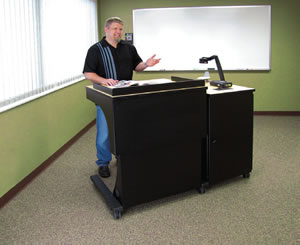
PHOTO COURTESY OF SPECTRUM INDUSTRIES, INC.
TAKE A STAND. A variety of designs and options are available for lecterns, so take the time to determine your needs, as one size
may not fit all. A height-adjustable worksurface allows presenters to sit or stand comfortably. Features such as monitor arms,
keyboard trays, built-in power strips and retractable cord reels facilitate technology. Good ventilation prevents equipment from
overheating, and locking doors can provide both easy access and security.
A key feature of these products, especially
lecterns, is to ensure that they can be
adjusted easily to accommodate individuals
of different heights and physical abilities.
Frank Kolavo, president of Computer
Comforts, has seen lecterns evolve from
bulky cabinets to modernized furniture
components that offer a range of features.
“Adjustable lecterns allow for faculty
members to sit in chairs while prepping
for classes. These lecterns also meet ADA
compliance,” he explains. Additionally,
lecterns with multiple functions like pullout
drawers that hold projection equipment
and document cameras and flip-up shelves
and side tables for added work space improve
the overall learning experience, yet
keep areas tidy.
Seeking a solution to a particular problem
can help match users to the product
that best meets their needs. Ford says,
“A mount used on a standalone podium
has different functionality than one in a
biology lab. The podium may only need a
tilt-positioning mount to allow for people
of different heights to use it. For lab use,
there is typically a need for a mount’s
arm to have the flexibility to move back
and forth.”
Other Considerations
Kolavo has worked closely with the
California State University and the University
of Texas to help these institutions
determine the lecterns that best fit their
needs. He says, “Ease of use is a big factor
for faculty members. They don’t want to
be trained on how to use products. They
expect to walk into the classroom and have
a user-friendly lectern available.”
After touring classrooms and observing
the setups at different schools, Tim
Schnabel, director of education programs
at Extron, addressed the fact that the
overall environment is as important as
the technology used in teaching. He says,
“Spending money on technology isn’t
going to do much for learning because a
holistic view of the classroom is needed.
Taking an aggregated approach will
improve the overall environment and the
components that go with the technology.
The carts and other supportive items are
just as important and cannot be overlooked.”
This article originally appeared in the issue of .
About the Author
Karen Spring has been a technical writer for more than 10 years. She began her career working as a marketing specialist for two computer distributors and as a senior editor for an IT publishing and consulting firm. Ms. Spring contributes to a weekly newsletter that highlights network and Internet security topics.